Share what you know, add what you can contribute, and learn together — not from expertise.
Focused Space
Isolated sessions away from distraction, designed for deep work.
Build Together
Combined learning leads to building. Different people excel in different areas.
No Expertise Required
Bring curiosity and willingness to contribute. Everyone has something to offer.
👥
Community Structure
Isolated Focus Sessions
Hourly sessions without distractions. Phones away, full presence.
Shared Vision
Part of a larger community with shared goals and values.
Mutual Support
Help others, ask for help, celebrate wins together.
Ongoing Collaboration
Connect with like-minded individuals for collaboration beyond this session.
Join the myKovai community. Learn together. Build together.
What is Agentic AI?
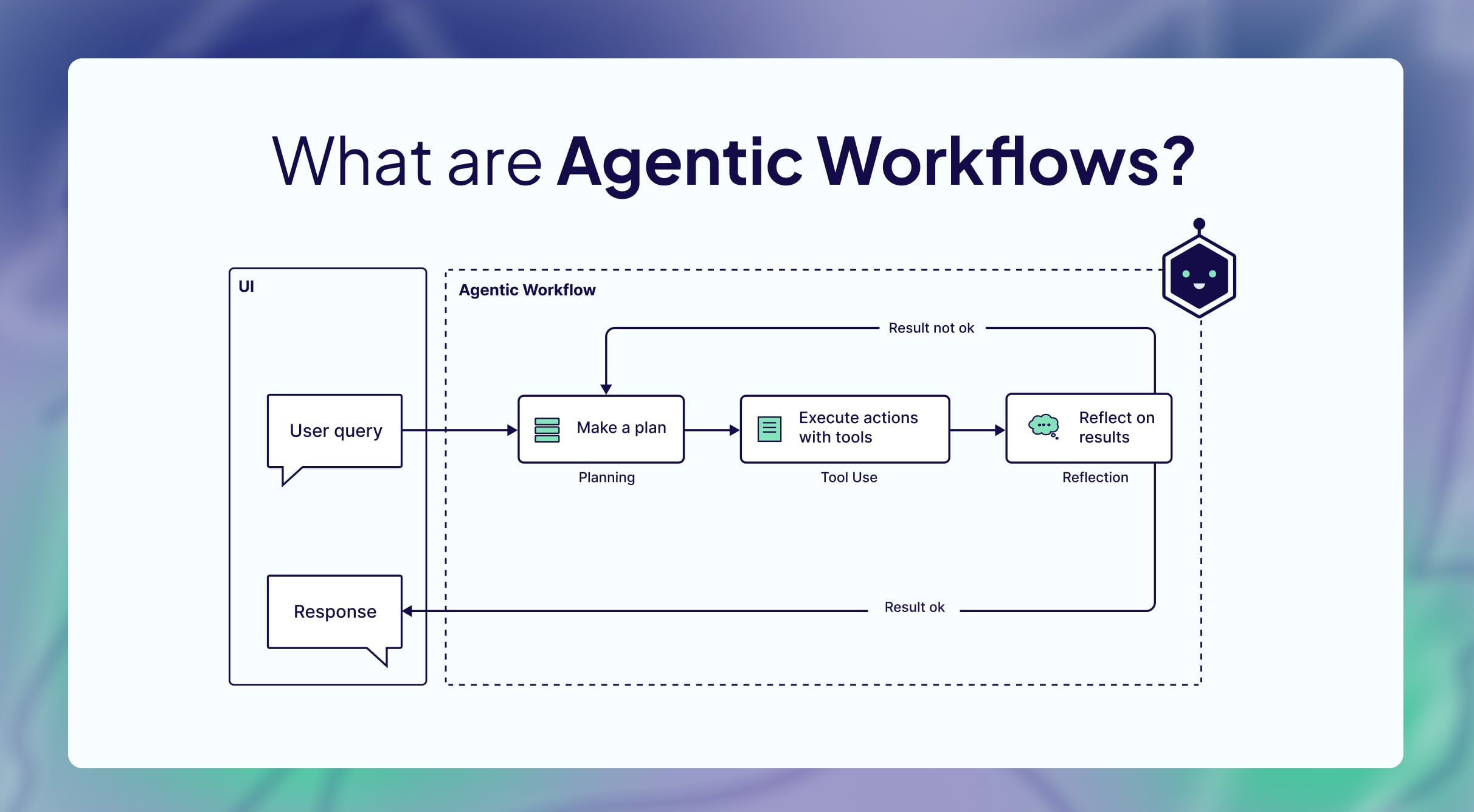
In 2026, Agentic AI is defined as systems composed of multiple coordinated AI agents
that can break down tasks, collaborate, and pursue complex objectives autonomously over extended periods.
The Perceive → Reason → Act → Learn loop
Goal-Oriented
Receives an objective, not just a prompt. "Plan my trip" vs "What's the weather?"
Multi-Step Reasoning
Autonomously decomposes complex goals into executable sub-tasks and sequences them.
Tool Orchestration
Dynamically selects and uses APIs, browsers, code interpreters, and enterprise systems.
Self-Adjusting
Evaluates outcomes, learns from feedback, and refines its strategy without human intervention.
The Paradigm Shift
Traditional AI
Reactive Assistance
Prompt-based interaction
Single task outputs
Limited tool usage
Static responses
Human controls every step
VS
Agentic AI
Proactive Execution
Goal-based execution
Multi-step workflows
Dynamic orchestration
Context-driven decisions
Semi-autonomous operation
The human role shifts from operator to supervisor.
Agents move work between tools instead of employees moving data between apps.
Why OpenClaw Matters Most
OpenClaw — Molty the Space Lobster
The Problem
Most agents live in prompts. Once the session ends, the agent loses its role, tools, and context. For enterprise workflows in Finance or DevOps, that's a reliability gap.
The OpenClaw Solution
Agent behavior is defined in explicit workspace Markdown files — persona, tools, operating instructions, and memory. These files live in version control. Everything is auditable.
Files ARE the Agent
No hidden configuration databases. Plain text, human-readable, git-tracked.
Full Auditability
Every behavior change is a diff. Review agent updates like code reviews.
Enterprise Ready
Departmental agents for Finance, Sales, DevOps with consistent governance.
Internal Ops Use Case
OpenClaw in NebulaKnowLab
We already use OpenClaw as an internal operations agent that helps employees respond faster,
helps admins coordinate better, and keeps daily work moving without repetitive follow-up.
P
Attendance Check-In
OpenClaw can ask each employee for their daily status over WhatsApp or connected messaging workflows using inputs like P, A, or WFH. Team members reply with a simple shorthand update instead of filling long forms.
✓
End-of-Day Tracking
At the end of the day, OpenClaw can follow up through the same chat flow for task completion status so work updates are collected consistently without managers manually chasing every person.
⏰
Admin Coordination
Admins can use it to schedule meetings, send calendar reminders, and keep team coordination moving from one place instead of handling each step manually.
G
Google Workspace Actions
Because it connects to Google accounts, OpenClaw can support email workflows and work across Calendar, Docs, and Sheets as part of everyday operations.
Operational Impact
These are just a few examples. OpenClaw can coordinate many internal workflows, connect across tools, and automate a wide range of everyday operational tasks for the team.
What is an AI Model & LLM?
AI Model
A computer system trained to learn patterns from data
Uses examples instead of fixed manual rules
Learns from large amounts of information during training
Improves by adjusting internal mathematical values
Can make predictions, decisions, or generate outputs
Used for: image recognition, spam detection, recommendations
+
LLM (Large Language Model)
A type of AI model focused entirely on human language
"Large" means: huge datasets, billions of parameters
A system that can perform tasks on its own using AI. It acts as an autonomous entity designed to observe information, plan actions, take actions, and achieve a goal.
How It Works
Combines: AI model (brain), memory, tools, and decision-making
Receives a goal or instruction
Understands the task using an LLM
Decides what steps are needed
Uses tools and checks results until completed
Agent vs LLM
LLM: Mainly generates text responses. Acts as the reasoning engine inside the agent.
An Agent can:
• Take actions & use software/tools
• Search the web & remember info
• Automate workflows
Example Workflow
Goal: "Book the cheapest flight"
Search airline websites
Compare prices & choose best option
Fill booking details & confirm
An LLM alone would only suggest how to do it unless connected to tools.
Simple Analogy
AI Model = brain trained on patterns LLM = language-focused AI brain AI Agent = AI system that can think, plan, and act to complete tasks
Examples of AI Agents
Customer support: solves problems automatically
Coding assistants: write and test code
Personal assistants: manage schedules, send emails, book appointments
Research agents: gather and summarize info
OpenClaw High-Level Architecture
Layered separation of concerns — each file has a single responsibility.
SOUL.md
Persona & Values
Role, behavioral boundaries, communication defaults, decision constraints
SSH hosts, API endpoints, device names, infrastructure context
→
SKILL.md
Capabilities
Reusable tool instructions with 3-tier override: Bundled → Local → Workspace
→
MEMORY.md
Persistence
Durable facts, daily logs, curated long-term memory across sessions
Insight: Update a skill without changing the agent's role. Adjust memory without rewriting instructions.
Agent Harness Landscape
High-level comparison of the leading agentic platforms in 2026
Capability
Claude Cowork
OpenClaw
Hermes Agent
OpenHuman
Open-source
Proprietary
MIT
MIT
GNU
Simple to start
Desktop + CLI
Terminal-first
Terminal-first
Clean UI, minutes
Cost model
Sub + add-ons
BYO models
BYO models
One sub + TokenJuice
Memory
Chat-scoped
Plugin-reliant
Self-learning
Memory Tree + Obsidian
Integrations
Few connectors
BYO
BYO
118+ via OAuth
Auto-fetch
None
None
None
20-min sync
API sprawl
Extra keys
BYOK
Multi-vendor
One account
Model routing
Single model
Manual
Manual
Built-in
Native tools
Code-only
Code-only
Code-only
Code + search + voice
Source: github.com/tinyhumansai/openhuman · Products evolve — verify against each vendor.
Installation Methods: Direct, Docker, & VPS
Deploying Agentic AI locally or in the cloud using reliable and scalable environments.
Direct Install
What is it? Running the AI agent natively on your local machine (Windows, Mac, Linux).
How it Works: Direct execution using Node.js, Python, or binaries without virtual layers.
Advantages: Quickest to test locally, utilizes direct hardware access (e.g. local GPU).
Limitations: Environment conflicts, harder to scale, requires keeping your PC on 24/7.
Docker
Containerization: Packages the AI agent and all its dependencies into a single unit.
Portability: Run the exact same setup on your local laptop or push it to the cloud seamlessly.
Isolation: Keeps the AI's files and processes safely separated from the host OS.
Reliability: Perfect for running autonomous bots with consistent environments.
VPS
What is it? A virtual machine on a shared physical server giving you isolated OS, CPU, and RAM.
How it Works: Grants root/admin access to independently install AI tools and run them remotely.
Advantages: 24/7 uptime, more control than shared hosting, and highly cost-effective.
Limitations: Requires technical Linux knowledge for maintenance and security.
LET'S BUILD
Let's Build Together
The question isn't whether agentic AI will transform your work. It's whether you'll be ready when it does.
⚡
Operate Faster
Agents move work between tools instead of employees moving data between apps
🛡️
Governance First
Explicit boundaries make autonomy auditable and safe
✛
Scale Differently
One well-defined agent multiplies across teams via version control
Join the myKovai community. Learn together. Build together.
Time to Build
Ready to Get Hands-On?
You've seen the theory. Now put it into practice.
Head to the Tasks page to find step-by-step instructions,
real-world challenges, and guided exercises to build and deploy your own Agentic AI workflows.